Local node and accounts
 Servers
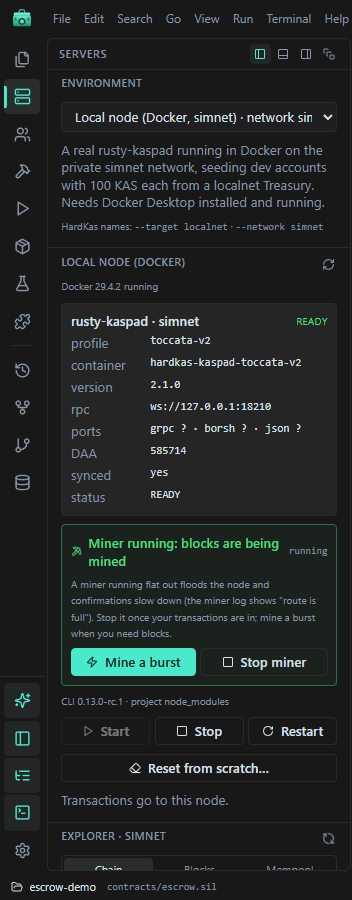
 shows the environment and HardKAS' local node: rusty-kaspa in Docker, on simnet. The IDE works with this one node only.
The Local node (Docker) card shows the node's state, container, version, RPC and DAA score, and refreshes every 30 seconds. If Docker is missing or stopped, the view says so and offers Switch to Simulator.
| Button | What it does |
|---|---|
| Start | hardkas localnet start --toccata, waits for the node, then gives each empty dev account 100 KAS. |
| Stop | Stops the node and its miner. The chain is kept. |
| Restart | Stop, then Start. |
| Reset from scratch… | Wipes the local chain and starts again (below). |
While one of these runs, a banner shows the steps and Accounts and Deploy & Run wait. The same actions are under Run → Local node.
Reset from scratch
It asks first, then: stops the node and miner, moves your account keys (.hardkas/accounts.real.json and .hardkas/dev-accounts/) to .hardkas/backups/reset-<time>/, deletes the chain data, runs hardkas node reset --yes, starts a fresh node and funds new dev accounts.
Your files and artifacts stay, but they describe a chain that no longer exists. If the key backup fails, nothing is deleted.
Watch out: the IDE does not show the backup folder and has no restore button. To get old keys back, stop the node and move the files back into .hardkas/ by hand. Their coins were on the wiped chain and do not come back.
The miner
A private simnet has no network mining for it: blocks only exist while the miner runs. HardKAS starts its CPU miner while it funds an account and stops it afterwards, so a transaction sent with the miner stopped waits in the mempool.
The miner box says "Miner running", "Miner stopped: nothing confirms" or "No miner yet":
| Button | When to use it |
|---|---|
| Mine a burst | You sent something and want it confirmed: mines until 1 more KAS reaches the first account, then stops. |
| Start miner | You want blocks for a while (several deploys in a row). |
| Stop miner | You are done, or the node warns route is full (the miner is too fast). |
Explorer
The Explorer card under Servers reads the node every 4 seconds: Chain (DAA score, tips, sync), Blocks (blocks mined, route is full), Mempool and UTXOs of an account or address.
 Accounts
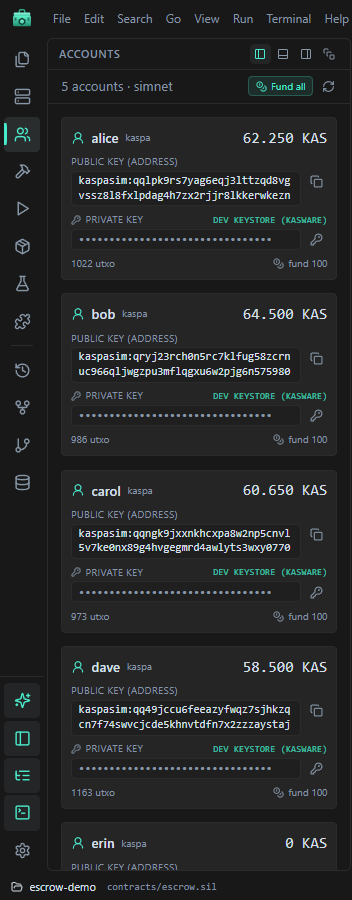
The accounts of the selected environment with their balances. Each card has:
- the address with a copy button;
- the private key, always hidden. Copying it asks first, and only works for local simnet dev keys, never testnet keys;
- fund 100: 100 KAS on the simulator or the local node. There is no testnet faucet.
Fund all tops up the empty accounts. Create adds a named account (hardkas localnet account create).
Watch out: accounts created this way keep their private key in plain text in .hardkas/accounts.real.json. Development coins only.
KasWare
At the bottom of Accounts, the KasWare card lists the values to add the local network to the KasWare extension (network id, wRPC, gRPC, address prefix) and the steps to import a dev account (Import Account → Private Key). Its Connect button only works when the IDE is open in a browser with the extension, not in the desktop window.