Editor and compiler
The editor
The editor is Monaco, the editor of VS Code, on the real files of your project. Ctrl+S saves; there is no auto-save.
For .sil files you get:
- highlighting, comments, bracket matching and folding;
- snippets (
contract,entry,require,checkSig…) and hover help; - the Outline (right) and breadcrumbs with the contract and its entries;
- live errors: when you stop typing or save, the real compiler checks the file and marks errors in the editor.
TypeScript, JavaScript, JSON, Markdown, YAML, TOML and shell files get highlighting too. Go to definition, rename and a SilverScript formatter are not available.
Right-click a .sil file for Compile SilverScript (Ctrl+Enter), Compile & Deploy…, Open Compiler panel and Visualize in Covenant Graph.
 The compiler panel
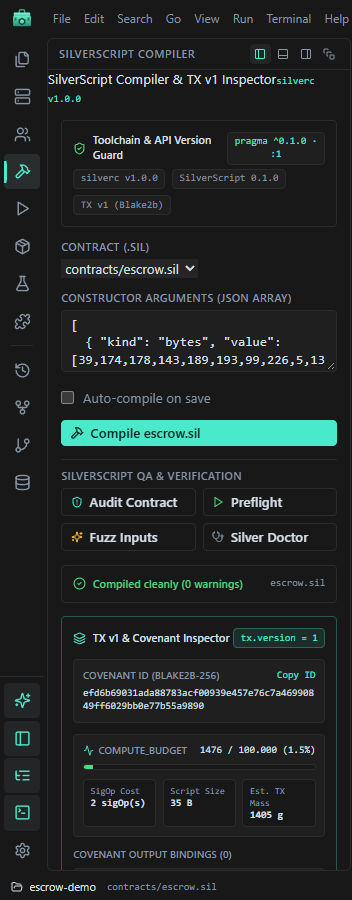
| Part | What it does |
|---|---|
| Contract (.sil) | The file to compile. While a .sil tab is active, it compiles that one. |
| Constructor arguments | A JSON array, kept in <name>.constructor-args.json next to the source. |
| Auto-compile on save | Compiles again shortly after you stop typing. |
| Compile | Saves, then runs hardkas silver compile <file> --json. |
| QA & Verification | Audit Contract, Preflight, Fuzz Inputs and Silver Doctor: the matching hardkas silver checks. |
A successful compile writes the compile record (.hardkas/artifacts/silver/silverCompile-*.json), which Deploy & Run and the Covenant graph use. Errors appear in the panel and in the editor; click one to jump to it.
Watch out:
- The TX v1 & Covenant Inspector and the SilverScript Source Debugger lower in the panel are rough estimates computed in the IDE, not the compiler or the node. Use the compile record, the local node and your tests for real values.
- The live check fills in placeholder constructor arguments, so a file can look clean and still fail Compile until you enter real ones.
- Deploying from Deploy & Run recompiles with its own arguments and overwrites
<name>.constructor-args.json.