 Deploy & Run
A form over HardKAS' transaction and contract commands. Every button runs a hardkas command (you see it in the Console) and leaves an artifact under .hardkas/artifacts.
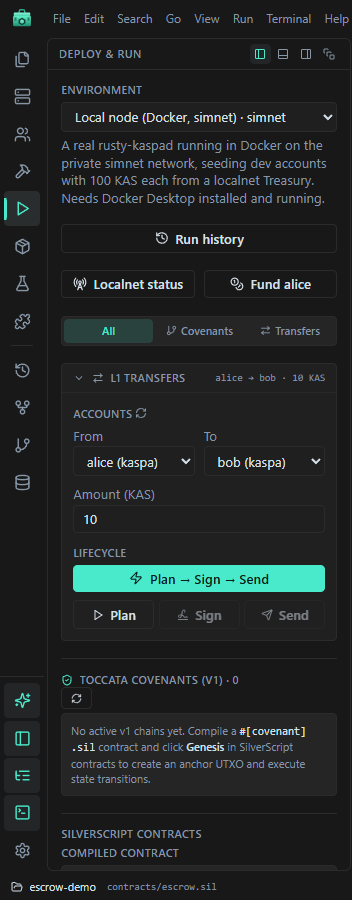
Payments
Pick From, To (an account or any address) and Amount (KAS), then:
- Plan → Sign → Send does the three steps in a row, or
- Plan, Sign and Send one at a time, to look at each artifact first (
hardkas tx plan,tx sign,tx send).
Each result card has open for its JSON. Check status on the node runs hardkas tx status.
Watch out: there is no confirmation dialog. On Public testnet, Send sends at once.
Contracts
Contracts are deployed on the local node. On another environment the view says so and offers Switch to Local Node. (The simulator does not run contract scripts.)
Deploy
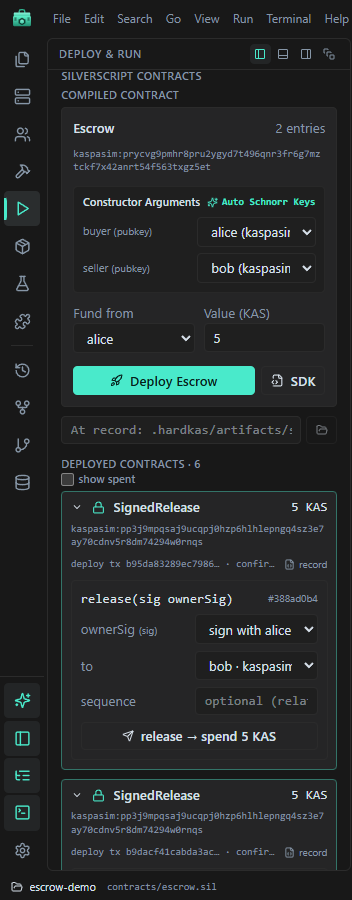
- Compile the contract in the compiler. It appears under Compiled contract.
- Fill the constructor arguments. A public-key parameter can take an account.
- Pick Fund from and Value (KAS), the amount locked in the contract.
- Deploy
<Name>runshardkas silver deploy … --wait --timeout 600.
Genesis <Name> does the same for a covenant contract. SDK writes TypeScript bindings to contracts/<Name>.ts (it replaces an existing file).
Call an entry
Under Deployed contracts, each deploy has one form per entry: its arguments (a signature is made with the account you pick), to and an optional sequence. The button <entry> → spend runs hardkas silver spend … --wait --timeout 600.
Covenant transitions
Toccata Covenants (v1) lists covenant chains. Each policy has a form for the next state (Advanced adds state map, constructor arguments, compute budget and fee); Transition runs hardkas silver covenant transition.
When nothing confirms
On the local node, blocks only exist while the miner runs (The miner). With the miner stopped, a small box here offers Mine a burst and Start miner.
A deploy or spend waits up to 600 seconds for its block. If none comes, the IDE shows an error and no record is written, even if the transaction confirms later; without a deploy record you cannot spend it from here. Start the miner before deploying.
Fund <account> at the top gives the selected account 100 KAS on the local node, whatever environment is selected.