 Assistant
The Assistant panel answers questions about Kaspa, SilverScript and your project (Chat), and can work on the project for you (Agent): edit files, compile, run tests and run HardKAS commands, asking you before anything that changes something.
Open it with the Assistant button at the bottom of the rail, View → Assistant or Help → Ask the Assistant. It is docked on the right.
OpenCode, the default
By default the IDE runs OpenCode, an open-source coding agent (MIT license) that ships inside the app. OpenCode uses free models hosted by OpenCode, so you need no account and no API key. The default model is opencode/deepseek-v4.1-flash-free.
You can use your own provider instead: Anthropic (Claude) or any OpenAI-compatible endpoint, with your own API key. See Settings below.
Off until you turn it on
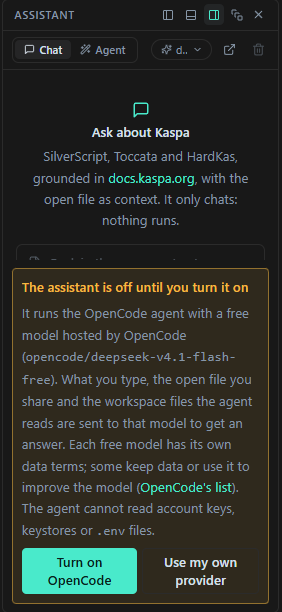
A fresh install sends nothing. Until you agree, the panel shows "The assistant is off until you turn it on" with what will be sent, and two buttons:
- Turn on OpenCode turns it on.
- Use my own provider opens the settings, where you pick Anthropic or an OpenAI-compatible endpoint and save.
To turn it off again, open the settings (the model chip) and click Turn off OpenCode.
What is sent
With OpenCode, these go to the selected model on OpenCode's servers:
- what you type, and the recent messages of the conversation;
- the open file, when you share it (the paperclip chip, below);
- the workspace files the agent reads while it works.
Each free model has its own data terms, listed on opencode.ai/docs/zen. OpenCode lists the default model and the next suggestions (glm-5.3-flash-free, minimax-m3.1-flash-free) as zero-retention and not used for training; big-pickle may use data to improve the model. Check that page before you pick a model.
With your own provider, the same things go to that provider's API, under its terms.
The agent never gets account keys, keystores or .env files: see Files the agent cannot read.
The panel
- Chat / Agent switches the mode. The IDE remembers your choice.
- The model chip shows the model in use and opens the settings.
- In Chat mode, Ask the Kaspa Research GPT instead copies your question, the environment and the open file to the clipboard and opens ChatGPT in your browser. The IDE sends nothing itself: you paste it there.
- The trash button is Clear chat in Chat mode and New task in Agent mode.
Below is the message box. Enter sends, Shift+Enter starts a new line, and the square button stops a reply or a run. The paperclip chip shows the open file: it is shared by default; click it to stop sharing (the name is struck through).
Chat
Chat only answers: nothing runs. With OpenCode, chat works read-only and turns down any action the model asks for.
- The open file you share is sent up to its first 24,000 characters. Key files are never sent.
- Code blocks have Copy, Insert at the cursor in the editor and Save as a new file (it asks for a path inside the project).
- The IDE keeps the last 40 messages of the chat on this machine.
Agent
Give the agent a goal, or pick one of the starter goals. While it works, the panel shows:
- the goal with a Running, Finished or Stopped badge;
- its latest reasoning;
- Steps: each action with its real output. Failed steps open by themselves; Open in editor opens a file it touched.
When the run ends, open files that you have not edited reload, and the file tree refreshes. Files with unsaved edits are never overwritten. The run is not kept after the IDE reloads.
The agent needs an open project.
"Finished" is the model's own claim. The IDE shows what it did; it does not check that the goal was reached. Read the steps, run the tests and look at the changes before you trust it.
Fix with AI
A Fix with AI button appears on error lines in the Console and on failing tests in the Tests view. It switches to Agent mode and starts a run with that error or failure as the goal.
Permission prompts
When the agent wants to do something that needs your OK, the run pauses and the panel asks "Allow this action in the workspace?". It shows the command, the file change or the HardKAS tool call, and reminds you that the action may come from a file or a page the agent read, and runs with your user in the project folder.
| Button | What happens |
|---|---|
| Run | Allows this one action. The button reads Run for file edits too. |
| Run all in this run | Allows this and every later action of this run without asking again. |
| Skip | Declines it. With OpenCode the run stops ("Stopped: you declined …"). With your own provider the model is told and goes on without it. |
A question left unanswered for ten minutes counts as declined, and so does stopping the run.
What asks and what does not
With OpenCode:
- Runs without asking: reading files, and HardKAS' read-only tools: workspace and environment status, listing and reading files, listing artifacts, querying the index, accounts and balances, transaction status, CLI help and the Kaspa docs.
- Asks first: every file edit, every shell command, and every other HardKAS tool: payments, deploys, contract spends, funding, node control, compiling and running tests.
With your own provider, the IDE runs its own agent. Only shell commands ask. Writing files, compiling, running tests and funding an account on the local node run without asking. A run stops after 16 model rounds.
Watch out: Run all in this run really means all. With OpenCode it also approves payments and deploys later in the run, without showing them first. Use it only when you have seen what the run is doing.
Files the agent cannot read
The agent is refused these files: .hardkas/accounts.real.json, .hardkas/dev-accounts/, the dev-server token, keystores and .env / .env.* files (the IDE's own agent also refuses id_rsa and .pem files). OpenCode cannot reach files outside the project either.
A shell command you approve runs as you, with your rights: it can read anything you can. Read the command before you click Run.
Settings
Click the model chip to open the settings:
| Setting | What it does |
|---|---|
| Provider | OpenCode (free), Anthropic (Claude) or OpenAI-compatible. Picking one resets Base URL and Model to that provider's defaults. |
| Model | Free text, with suggestions. Anthropic defaults to claude-sonnet-5-5. For OpenAI-compatible, type the model your endpoint serves. |
| Base URL | Your provider's API address: https://api.anthropic.com or https://api.openai.com/v1 by default, or your own endpoint. Not for OpenCode. |
| API key | Your key, kept in the system credential store (see API keys). Not for OpenCode. |
| Kaspa docs as context | Core pack (a few key pages of docs.kaspa.org), Full docs corpus (larger, costs more per question) or Off. The panel shows the approximate size. Not for OpenCode. |
Buttons: Save, Remove key, Turn off OpenCode and Close. The settings, without the key, are kept in ~/.hardkas-ide/assistant.json. The Kaspa docs are fetched by the IDE and cached for a day in ~/.hardkas-ide/cache.
API keys for Claude and OpenAI
OpenCode needs no key. For Anthropic (Claude) and OpenAI-compatible providers, you give the IDE your own API key in one of two ways:
- Save it in the settings. The IDE stores it in your system's credential store: Windows Credential Manager, the macOS Keychain or the Secret Service on Linux, under the name
hardkas-ide. It is never written to a file, and the panel never gets it back: it shows only its last four characters ("saved …abcd"). - Set an environment variable before you start the IDE:
ANTHROPIC_API_KEYfor Anthropic,OPENAI_API_KEYfor OpenAI-compatible. A variable wins over a saved key. The settings then say "from ANTHROPIC_API_KEY" (orOPENAI_API_KEY); remove the variable to manage the key in the IDE again.
Each provider has its own key. Remove key deletes the saved key from the credential store.
A local OpenAI-compatible server, such as Ollama at http://localhost:11434/v1, needs no key.
No credential store. If the system has none (some Linux setups have no Secret Service running), saving fails with "Could not save the key in the system credential store". Use the environment variable instead.
Keys from earlier versions. Earlier versions saved the key in plain text in ~/.hardkas-ide/assistant.json. The IDE moves such a key into the credential store and removes it from the file the next time it reads its settings. If it cannot (no credential store), the key stays in the file and the settings warn "still in a settings file: save it again or set the variable".
This key storage is new and was still being finished when this page was written. If your build's settings say the key is stored in assistant.json, it still keeps keys in that file in plain text.